How We Made It Talk — Handled Async Communication with Server Sent Events (SSE)
networking
pooling
server-sent-events
How We Made It Talk — Handled Async Communication with Server Sent Events (Part 2)
The System Worked, But It Was Silent
How We Built a Profitable Photobooth System That Earned Hundreds of Millions of Rupiah
After solving the payment fraud problem, our photobooth system was working. Payments were verified, QR Codes were secured, DSLRBooth session were triggered automatically.
Everything was great, but in reality?
The system didn’t talk, not to customers, staffs, even the system itself. In a visible way. We had a solid state machine running everything in the system, managing session flow, payment status, printing status, taking pictures, and resets. It was the core of our photobooth machine. But it was a quiet brain.
The silence had a cost. If a state changed inside the system but no one knew it caused confusion. A payment might succeed, but the UI wouldn’t reflect it. The booth could finish printing, while the screen still showed “wait for printing.” Errors happened quietly, and users were left in the dark.
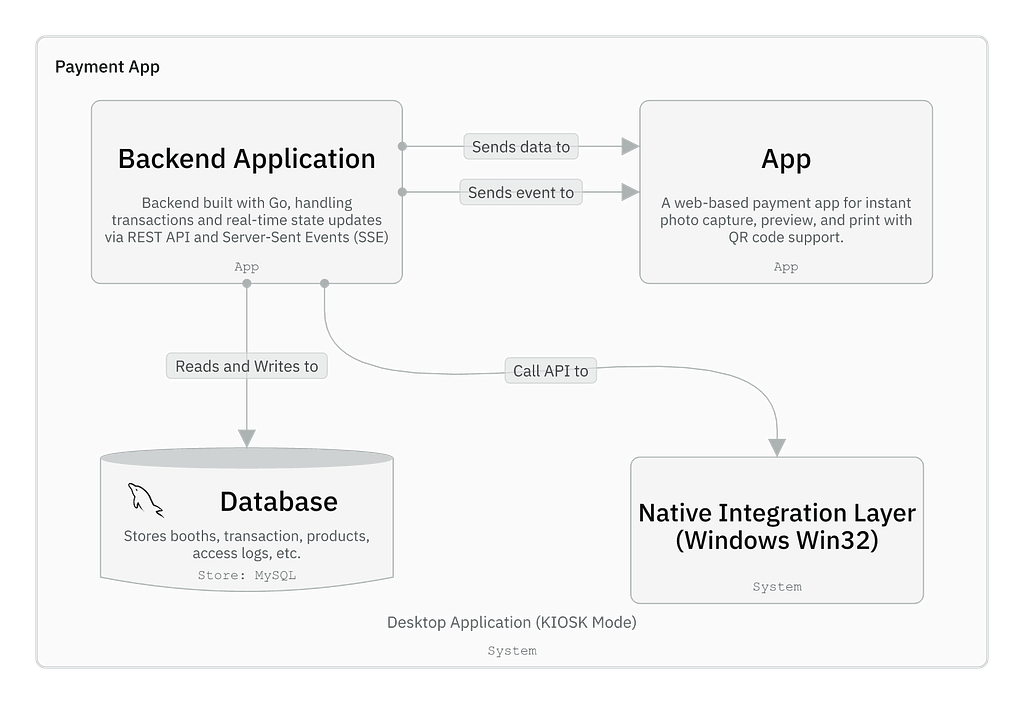
Container of the Payment App (C4 Model)
The app consists of a Go backend, a web-based frontend, a MySQL database, and a Windows integration layer (W32 DLL). The backend communicates with the frontend primarily via Server-Sent Events (SSE) to deliver real-time transaction updates, enabling a responsive, event-driven user experience in a kiosk environment (see Figure 1).
Exploring Our Options: From Polling to SSE
To improve communication between apps, we explored multiple approaches and compared them to find the most effective solution. We considered two main options:
- Build a complex feedback loop.
- or find a simple, reliable, and scalable.
So, we explored:

SSE gave us everything we needed:
- Simple, One-way communication.
- Lightweight, no handshaking (only initial) or heartbeat.
- A centralized, consistent source of truth.
Code in Action: Our SSE Transaction Stream
To connect our state machine to the outside world, we exposed a Server-Sent Events (SSE) endpoint. Here is how the server-side code works:
Handler, this endpoint is to open SSE connection
func (h *TransactionHandler) sseTransaction(c echo.Context) error {
 ctx := c.Request().Context()

 boothSerial := c.Param("booth_serial")

 log.Info().Msgf("incoming SSE transaction, booth serial: %s", boothSerial)

 // Set header for SSE
 c.Response().Writer.Header().Add(echo.HeaderContentType, "text/event-stream")
 c.Response().Writer.Header().Add(echo.HeaderCacheControl, "no-cache")
 c.Response().Writer.Header().Add(echo.HeaderConnection, "keep-alive")
 c.Response().WriteHeader(http.StatusOK)

 // Set SSE connection
 h.trxSvc.SetSSEConnection(ctx, boothSerial, make(chan *entity.Transaction))
 sseConnection := h.trxSvc.GetSSEConnection(ctx)

 defer func() {
  log.Info().Msgf("closing SSE connection for booth serial: %s", boothSerial)
  err := h.trxSvc.DeleteSSEConnection(ctx, boothSerial)
  if err != nil {
   log.Error().Err(err).Msgf("failed to delete SSE connection %s", boothSerial)
  }
 }()

 for {
  select {
  case trx := <-sseConnection[boothSerial]:
   c.Response().Write([]byte(fmt.Sprintf("data: %s\n\n", trx.PaymentStatus)))
   c.Response().Flush()
  case <-ctx.Done():
   return nil
  }
 }
}
Also, this example of implementation by sent transaction status through SSE.
...

// Server Sent Event for transaction from payment callback
// Sent whether the transaction is paid or not
sseConnection := h.trxSvc.GetSSEConnection(ctx)
if sseConnection[trx.CustomerSerial] != nil {
  nTrx := trx.WithPaymentStatus(tripay.PaymentStatusEnum(request.Status))
  log.Info().Msgf("sent transaction to customer serial: %s %s", nTrx.CustomerSerial, nTrx.PaymentStatus)
  sseConnection[trx.CustomerSerial] <- nTrx
}

...
Now, this is the SSE Connection Manager, the part that give machine ability to track and push updates to individual session in real-time.
type TransactionService interface {
 ...
 GetSSEConnection(ctx context.Context) map[string]chan *entity.Transaction
 SetSSEConnection(ctx context.Context, serial string, ch chan *entity.Transaction)
 DeleteSSEConnection(ctx context.Context, serial string) error
}

type transactionService struct {
 cfg              config.Config
 sseConnection map[string]chan *entity.Transaction
 ...
}

func NewTransactionService(cfg config.Config) TransactionService {
 return &transactionService{
  cfg:              cfg,
  sseConnection:    make(map[string]chan *entity.Transaction),
 }
}

func (ts *transactionService) GetSSEConnection(ctx context.Context) map[string]chan *entity.Transaction {
 return ts.sseConnection
}

func (ts *transactionService) SetSSEConnection(ctx context.Context, serial string, ch chan *entity.Transaction) {
 if _, ok := ts.sseConnection[serial]; ok {
  close(ts.sseConnection[serial])
 }

 ts.sseConnection[serial] = ch
}

func (ts *transactionService) DeleteSSEConnection(ctx context.Context, serial string) error {
 if _, ok := ts.sseConnection[serial]; !ok {
  return fmt.Errorf("%w - SSE connection not found", entity.ErrNotFound)
 }

 close(ts.sseConnection[serial])
 delete(ts.sseConnection, serial)
 return nil
}
This simple in-memory service helped us scale the system without external deps (like redis, pub/sub, queue). For current case, this is enough.
Listening to Realtime Updates on the UI Side
Once we provided the SSE Transaction Stream, we had to make sure the client was ready to listen.
To make it reactive and self-updating, we wrote a simple yet powerful SSE integration using a custom provider. Here’s how we did it:
import { ReactNode, useEffect } from 'react';

import { isPaymentStatusType, PaymentStatus } from '@/modules/payment/entity';
import { useConfig } from '@/providers/ConfigProvider';
import { sleep } from '@/shared/async';
import { useSSETransactionStore } from '@/state/useSSETransactionStore';

export function SSEProvider(props: { children: ReactNode }) {
  const config = useConfig();

  const SetSSETransactionPaymentStatus = useSSETransactionStore(
    (state) => state.setPaymentStatus,
  );

  useEffect(() => {
    const sse = new EventSource(
      `${config.api_host}/stream/transaction/${config.customer_serial}`,
      { withCredentials: false },
    );

    sse.onopen = () => {
      console.log('SSE connection opened');
    };

    sse.onerror = (event) => {
      switch (sse.readyState) {
        case EventSource.CONNECTING:
          console.log('SSE reconnecting...');
          break;
        case EventSource.CLOSED:
          console.log('SSE connection closed');
          break;
        default:
          console.error('SSE error', event);
          break;
      }
      // ! The onerror will catch any condition of the EventSource's state,
      // you can use this for make a generic handlers
    };

    sse.onmessage = (event) => {
      console.log('SSE message received', event);

      if (!event.data) {
        console.error('Invalid event data', event);
        return;
      }

      if (isPaymentStatusType(event.data)) {
        SetSSETransactionPaymentStatus(event.data as PaymentStatus);
      }

      // example: if the event data is getting the payment status
      // then reload the page or do anything else
      if (event.data === PaymentStatus.PAID.toString()) {
        const delayTime = 1.5 * 1000; // 1.5
        sleep(delayTime).then(() => window.location.reload());
      }

      // ! Actually, we can leverage this function to handle anything,
      // even if we make it reliable to any condition, it still works.
    };

    return () => {
      sse.close();
    };
  }, [config]);

  return <>{props.children}</>;
}
Why this matters?
- State Management Integrated
store at global store useSSETransactionStore, any component can react to it. - User Experience Boost
No polling, no spinners that hang forever. Just UI changes instantly after the payment status informed. - Lean and Simple
No third-party SSE Library, just native EventSource scoped with React’s lifecycle via useEffect
The Real Win: A Smooth, Untouchable Transition
After implementing Server-Sent Events (SSE), our system could finally wait for the right moment before doing anything. No more guessing, no more button spam, no more waiting.

With that real-time signal in place, we paired it with a custom W32 DLL to safely switch the window focus to DSLRBooth only when the system was ready.
✅ SSE gave us the green light.
✅ W32 made the window switch seamless.
The result: zero glitches, no crashes, and fully hands-free transition from payment app to photo capture and from printing to payment app (reset).
A tiny improvement with massive impact on stability especially in a crowded, high-pressure event setting.
Final Thoughts
SSE isn’t just for fun, we thought it through, tested our option, and picked the right tool based on our usecase.
SSE gave us real-time control and when paired with W32 DLL and State Machine, it made switching between apps smooth and bulletproof. No more glitches, no more chaos.
Just a system that knows what it’s doing.
In the next part, I’ll walk you through the engineering behind the scenes:
- Designed State-Machines to manage app flow reliably.
- W32 gave us an edge, a native DLL that quietly enforced protection from user tampering.
- Internet down? No worries — just switch to offline mode.